Child TESLA MODEL S 2018 User Guide
[x] Cancel search | Manufacturer: TESLA, Model Year: 2018, Model line: MODEL S, Model: TESLA MODEL S 2018Pages: 195, PDF Size: 5.51 MB
Page 30 of 195

Always position single-strap tethers to run
over the top of the head support.
Note: To prevent the single-strap tether from
moving side to side, the top of the head support deforms.
Testing a Child Safety Seat
Before seating a child, always make sure the
child safety seat is not loose:
1. Hold the child safety seat by the belt path
and try to slide the safety seat from side
to side and front to back.
2. If the seat moves more than 2.5 cm, it is
too loose. Tighten the belt or reconnect
the ISOFIX retained child safety seat.
3. If you are unable to reduce slack, try a
different seat location or try another child
safety seat.
Child Safety Seat Warnings
Warning: Never seat a child in a child
safety seat or a booster seat on the front
passenger seat when the airbag is
activated. Doing so can cause serious injury or death.Warning: Never use a rearward facing
child restraint on a seat protected by an
active airbag. Doing so can cause serious
injury or death. Refer to the warning label
located on the sun visor.Warning: Child restraint systems are
designed to be secured in vehicle seatsby lap belts or the lap belt portion of a lap-shoulder belt. Children could be
endangered in a crash if their child restraints are not properly secured in the
vehicle.Warning: According to collision statistics,
children are safer when properly
restrained in the rear seating positions
than in the front seating positions.Warning: Do not use a forward facing
child safety seat until your child weighs
over 9 kg and can sit independently. Up
to the age of two, a child
Page 31 of 195
Warning: Never use a child safety seat
that has been involved in a collision. Have
the seat inspected or replaced as
described in the child safety seat
manufacturer
Page 32 of 195
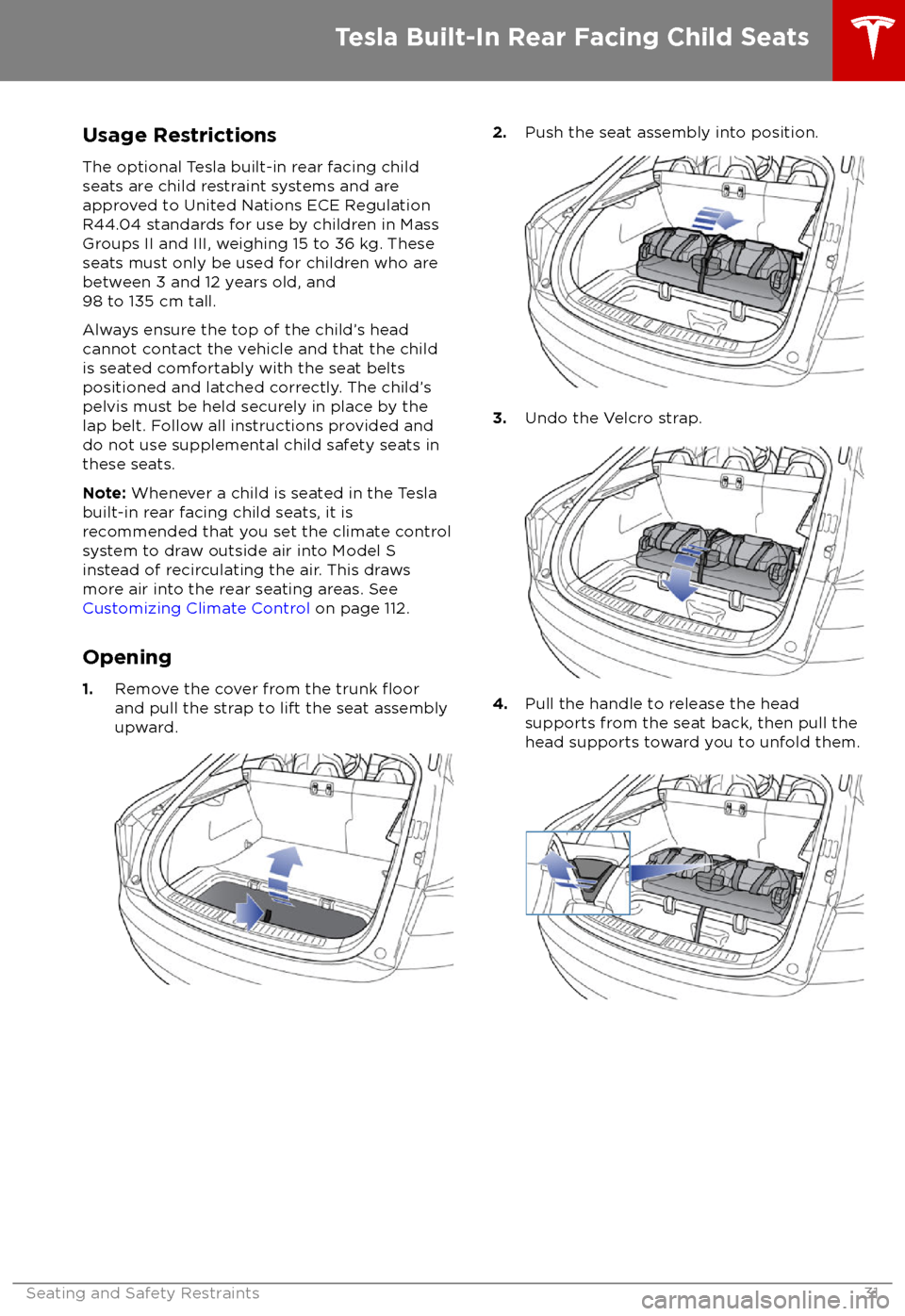
Usage RestrictionsThe optional Tesla built-in rear facing child
seats are child restraint systems and are
approved to United Nations ECE Regulation
R44.04 standards for use by children in Mass
Groups II and III, weighing 15 to 36 kg. These
seats must only be used for children who are
between 3 and 12 years old, and
98 to 135 cm tall.
Always ensure the top of the child
Page 33 of 195

5.Raise the seat back to the upright position
and push until it locks into position. Visually check to ensure that the retaining
catches are engaged.
6. Check that the seat back and seat base
are securely retained in the upright
position by trying to pull the seat back
toward you.
Folding
Caution: Before folding the seats, fasten
the seat belts to prevent them from
getting trapped in the seat mechanism
and being damaged.
1. Pull the handle to release the seat back
and pull the seat back fully forward.
2. Push the lever to release the head
supports from the seat back, then fold
back onto the seat.
3. Secure the Velcro strap.
4.Pull the strap at the rear of the seat to fold
the seat assembly into the trunk floor.
5. Replace the cover on the trunk floor.
Seating a Child
The Tesla built-in rear facing child seats are
child restraint systems and are approved to
United Nations ECE Regulation R44.04
standards for use by children in Mass Groups II
and III, weighing 15 - 36 kg. These seats must
only be used for children who are between 3
and 12 years old, and 98 - 135 cm tall.
Tesla Built-In Rear Facing Child Seats
32Model S Owner
Page 34 of 195
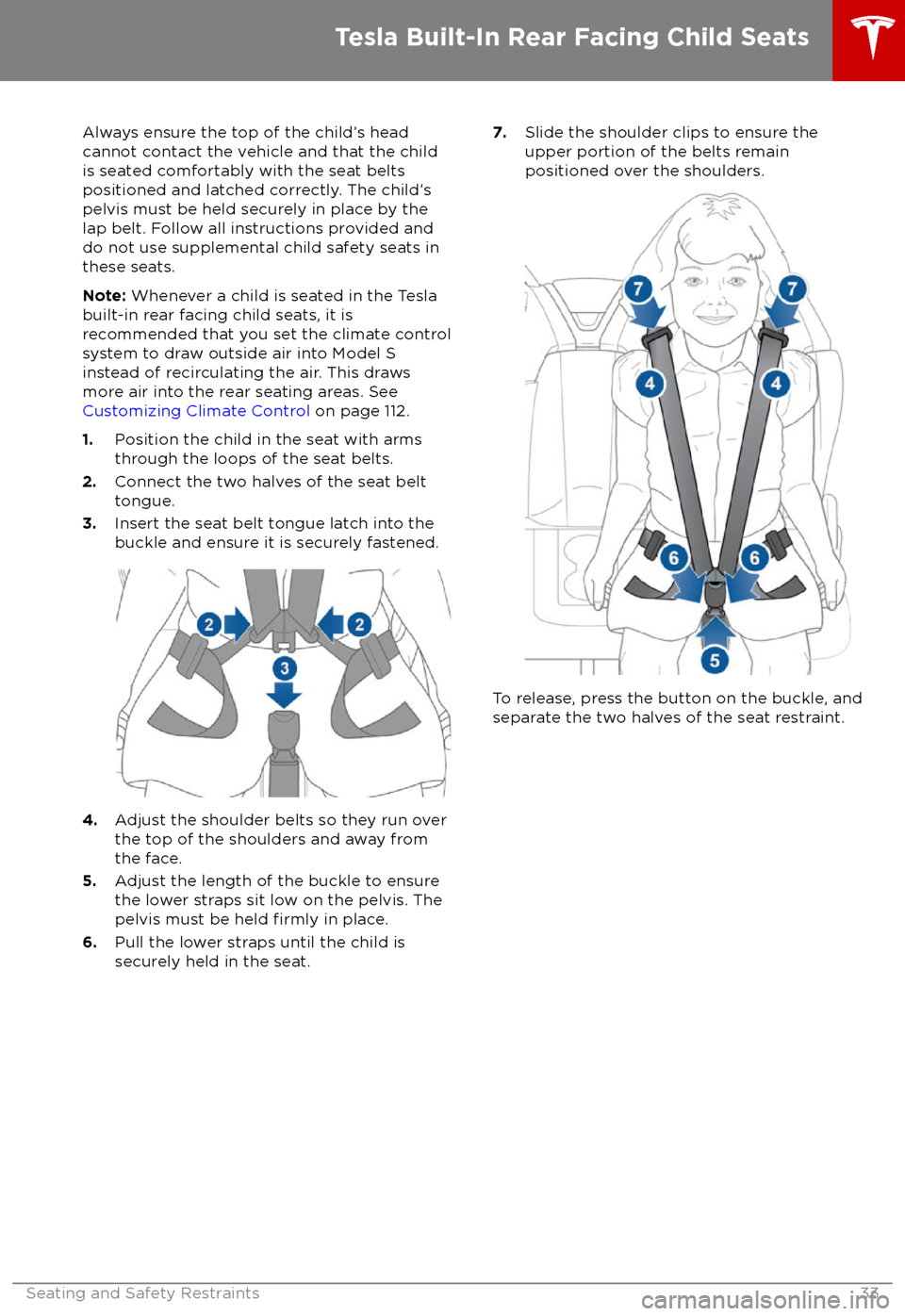
Always ensure the top of the child
Page 35 of 195
Warnings - Tesla Child SeatsWarning: The Tesla built-in rear facing
seats are child restraint systems and are
approved to United Nations ECE
Regulation R44.04 standards for use by
children in Mass Groups II and III,
weighing 15 to 36 kg. These seats must
only be used for children who are
between 3 and 12 years old, and
98 to 135 cm tall, provided the top of the
child
Page 38 of 195

Disabling the Passenger Front
Airbags
When a child is seated in the front passenger
seat (even when the child is seated in a child safety seat or booster seat), you must disable
the passenger front airbags to prevent them
from injuring the child if a collision occurs.
Note: Rear seats are the preferred location for
seating children in child safety seats.
To turn
off the front and side airbags on the
passenger side of the vehicle, touch
Controls > Settings > Safety & Security >
Passenger Front Airbag .
The OFF status of the front passenger airbag
displays in the upper right corner of the touchscreen. When the airbag is ON, no status
is displayed on the touchscreen.
If the airbag is on, even if you have turned itoff (or vice versa), contact Tesla immediately.
Note: Model S has a capacitive touchscreen
and may not respond to your touch if you are
wearing standard gloves. If the touchscreen is
not responding, remove gloves or wear gloves
with conductive
fingertips for use with
capacitive touchscreens.
Warning: Never seat a child in a child
safety seat or a booster seat on the front
passenger seat when the airbag is
activated. Doing so can cause serious injury or death.Warning: If the passenger airbag control
does not appear to be functioning, do not
seat a passenger in the front seat.
Contact Tesla immediately to have the
vehicle inspected and if necessary,
repaired.
Inflation Effects
Warning: When airbags inflate, a finepowder is released. This powder can
irritate the skin and should be thoroughly
flushed from the eyes and from any cuts
or abrasions.
After inflation, the airbags deflate to provide a
gradual cushioning effect for the occupants
and to ensure the driver
Page 39 of 195
bags if a collision occurs. It can also
reduce the accuracy of the occupant
detection system, if equipped.Warning: Airbags inflate with
considerable speed and force, which can
cause injury. To limit injuries, ensure that occupants are wearing seat belts and are
correctly seated, with the seat positioned as far back as possible.Warning: Do not use a child safety seat or
seat young children on a seat with an
operational airbag in front of it. Doing so
can cause injury or death if the airbag
inflates.
Warning: To ensure correct inflation of
the side airbags, maintain an
unobstructed gap between an occupant
Page 65 of 195
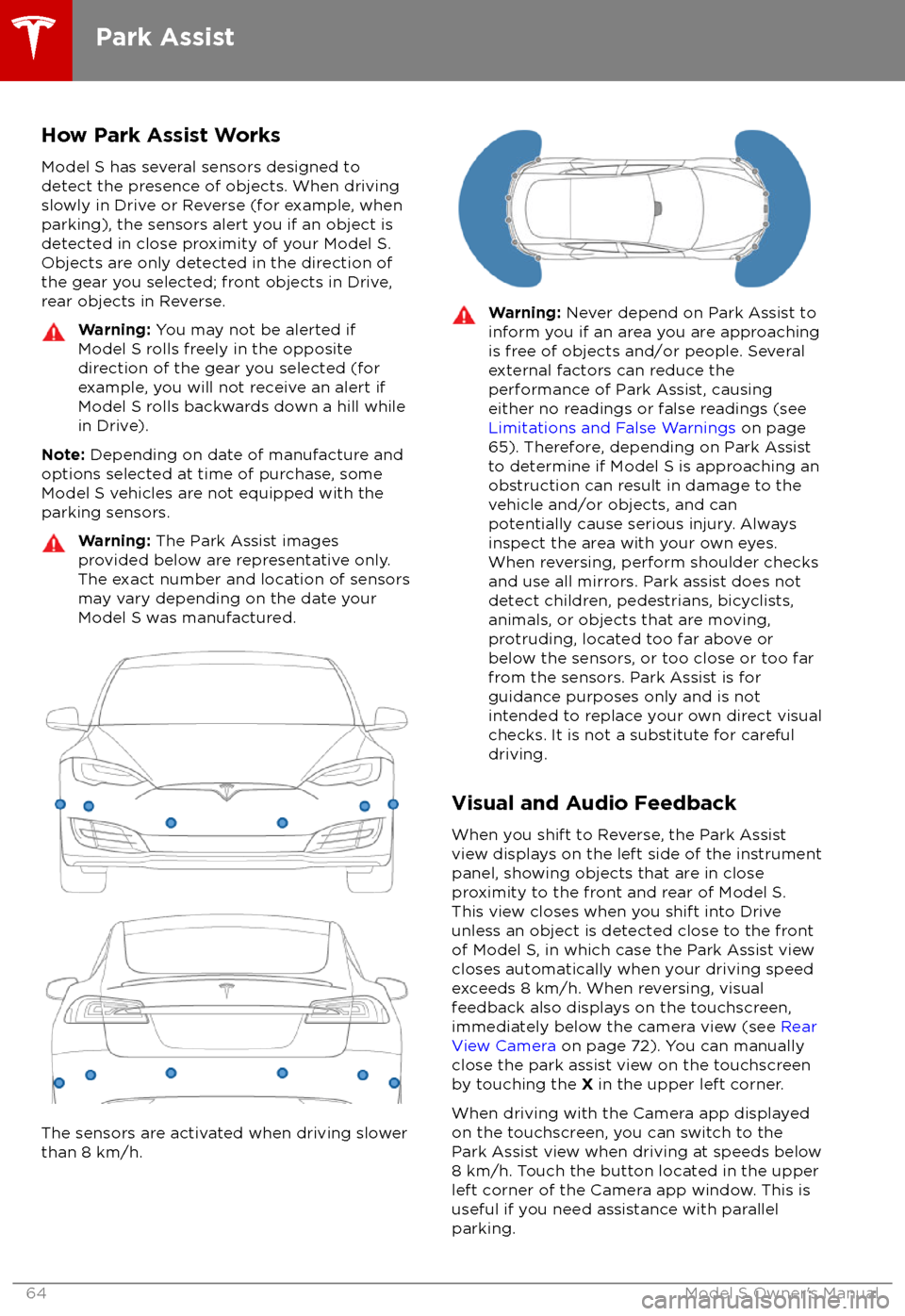
How Park Assist WorksModel S has several sensors designed todetect the presence of objects. When drivingslowly in Drive or Reverse (for example, when
parking), the sensors alert you if an object is detected in close proximity of your Model S.
Objects are only detected in the direction of
the gear you selected; front objects in Drive,
rear objects in Reverse.Warning: You may not be alerted if
Model S rolls freely in the opposite
direction of the gear you selected (for
example, you will not receive an alert if
Model S rolls backwards down a hill while
in Drive).
Note: Depending on date of manufacture and
options selected at time of purchase, some Model S vehicles are not equipped with theparking sensors.
Warning: The Park Assist images
provided below are representative only.
The exact number and location of sensors may vary depending on the date your
Model S was manufactured.
The sensors are activated when driving slower
than 8 km/h.
Warning: Never depend on Park Assist to
inform you if an area you are approaching is free of objects and/or people. Several
external factors can reduce the
performance of Park Assist, causing
either no readings or false readings (see
Limitations and False Warnings on page
65). Therefore, depending on Park Assist
to determine if Model S is approaching an obstruction can result in damage to the
vehicle and/or objects, and can
potentially cause serious injury. Always
inspect the area with your own eyes.
When reversing, perform shoulder checks and use all mirrors. Park assist does not
detect children, pedestrians, bicyclists,
animals, or objects that are moving, protruding, located too far above or
below the sensors, or too close or too far
from the sensors. Park Assist is for
guidance purposes only and is not intended to replace your own direct visual
checks. It is not a substitute for careful
driving.
Visual and Audio Feedback
When you shift to Reverse, the Park Assist
view displays on the left side of the instrument panel, showing objects that are in close
proximity to the front and rear of Model S.
This view closes when you shift into Drive
unless an object is detected close to the front
of Model S, in which case the Park Assist view
closes automatically when your driving speed
exceeds 8 km/h. When reversing, visual
feedback also displays on the touchscreen,
immediately below the camera view (see Rear
View Camera on page 72). You can manually
close the park assist view on the touchscreen
by touching the X in the upper left corner.
When driving with the Camera app displayed on the touchscreen, you can switch to the
Park Assist view when driving at speeds below
8 km/h. Touch the button located in the upper
left corner of the Camera app window. This is
useful if you need assistance with parallel parking.
Park Assist
64Model S Owner
Page 114 of 195
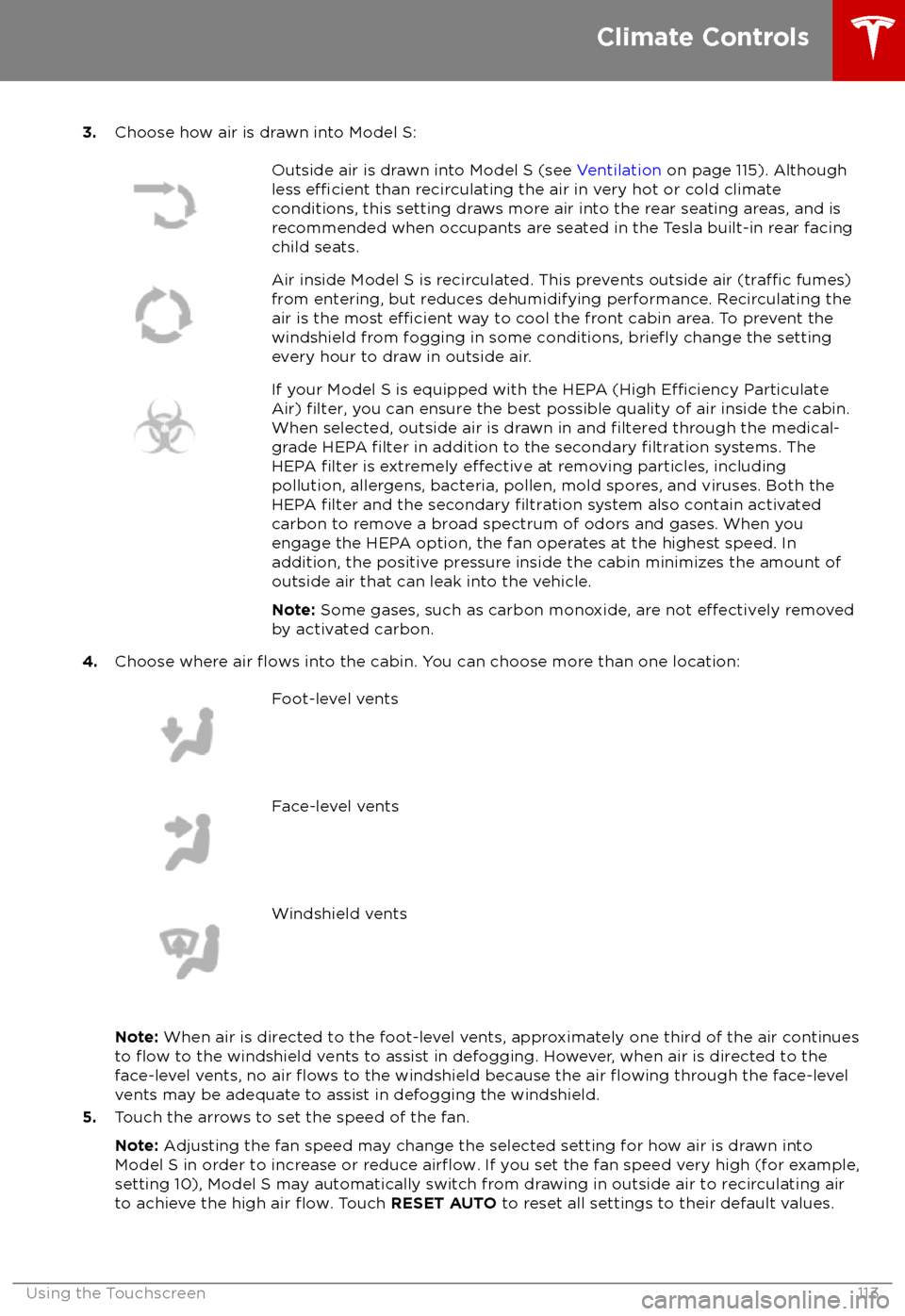
3.Choose how air is drawn into Model S:Outside air is drawn into Model S (see Ventilation on page 115). Although
less efficient than recirculating the air in very hot or cold climate
conditions, this setting draws more air into the rear seating areas, and is
recommended when occupants are seated in the Tesla built-in rear facing
child seats.Air inside Model S is recirculated. This prevents outside air (traffic fumes)
from entering, but reduces dehumidifying performance. Recirculating the
air is the most
efficient way to cool the front cabin area. To prevent the
windshield from fogging in some conditions, briefly change the setting
every hour to draw in outside air.
If your Model S is equipped with the HEPA (High Efficiency Particulate
Air) filter, you can ensure the best possible quality of air inside the cabin.
When selected, outside air is drawn in and filtered through the medical-
grade HEPA filter in addition to the secondary filtration systems. The
HEPA filter is extremely effective at removing particles, including
pollution, allergens, bacteria, pollen, mold spores, and viruses. Both the
HEPA
filter and the secondary filtration system also contain activated
carbon to remove a broad spectrum of odors and gases. When you
engage the HEPA option, the fan operates at the highest speed. In
addition, the positive pressure inside the cabin minimizes the amount of
outside air that can leak into the vehicle.
Note: Some gases, such as carbon monoxide, are not
effectively removed
by activated carbon.
4. Choose where air flows into the cabin. You can choose more than one location:
Foot-level ventsFace-level ventsWindshield vents
Note: When air is directed to the foot-level vents, approximately one third of the air continues
to flow to the windshield vents to assist in defogging. However, when air is directed to the
face-level vents, no air flows to the windshield because the air flowing through the face-level
vents may be adequate to assist in defogging the windshield.
5. Touch the arrows to set the speed of the fan.
Note: Adjusting the fan speed may change the selected setting for how air is drawn into
Model S in order to increase or reduce
airflow. If you set the fan speed very high (for example,
setting 10), Model S may automatically switch from drawing in outside air to recirculating air to achieve the high air
flow. Touch RESET AUTO to reset all settings to their default values.
Climate Controls
Using the Touchscreen113